
Before you begin
Open the correct business in day or week view and select one specialist to manage their intervals.
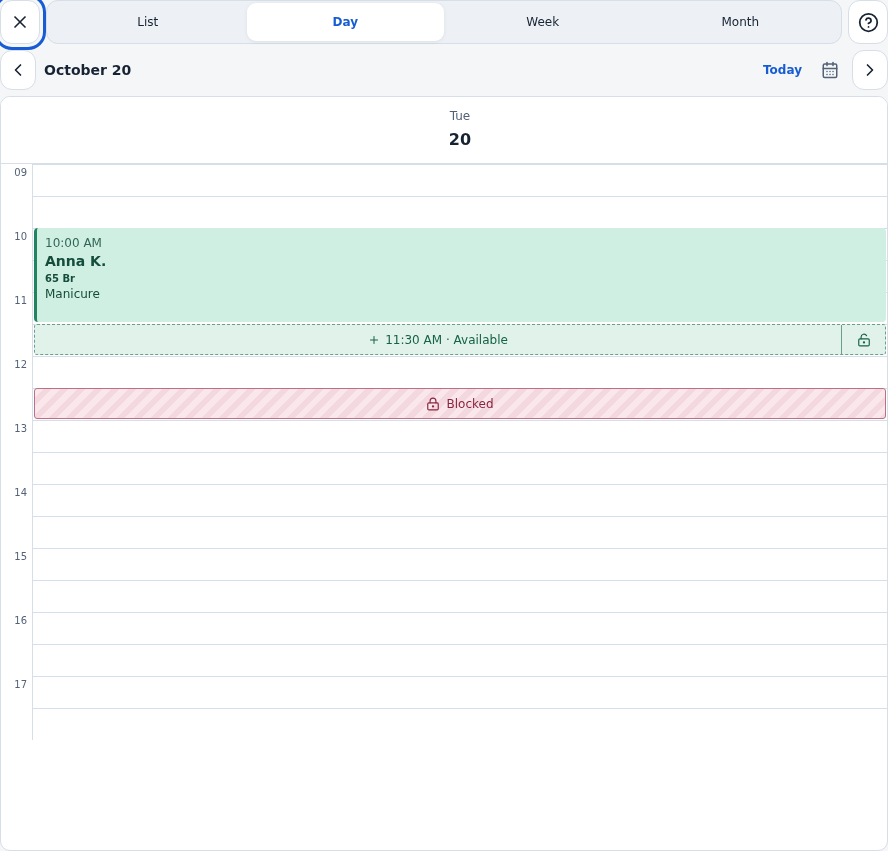
Working hours, free slots, blocked intervals and client visits are separate. Moving a free slot does not move an existing appointment.
Step-by-step guide
Select the day and specialist
Open Appointments in Day or Week view. Choose a specialist; slot controls may be unavailable when viewing several together.
Distinguish the actions
The plus starts a booking. The lock controls interval availability. Read the label or tooltip before choosing.
Block or unblock an interval
Use the block action for the time and wait for saving. Use the available unblock action for blocked time. Check the calendar legend and result.
Move an eligible free slot
Press and hold its lock and drag within the same day. Movement uses 15-minute steps. Check the preview time and availability before releasing.
Use keyboard controls when needed
Focus the controlling lock. Up and Down adjust time; Enter saves and Esc cancels. Do not save a preview marked unavailable.
Check online booking
After saving, test availability for the relevant service. Use Schedule for recurring weekly changes and the visit card to reschedule a client.
Check the result
The interval is blocked, reopened or moved, and existing client visits have been checked separately.
Questions and solutions
A booking form opened instead
You selected the add action. Close it and use the interval’s lock.
The slot cannot be moved
Not every interval supports moving. Check the specialist, conflicts with visits and blocks, and remain within the same day.
How do I close a day or change the week?
Use date exceptions or the standard specialist schedule rather than editing many intervals.
A client appointment remained after blocking
Blocking free time does not cancel an existing visit. Manage it separately and agree changes with the client.