
Before you begin
You need business settings access and a calendar app supporting URL subscriptions.
The secret link gives anyone holding it access to appointment and client data. Share it only with trusted people. Use the subscription for viewing and edit appointments in Vequr.
Step-by-step guide
Open calendar subscriptions
Go to Settings → Calendar subscription and choose the business if you have several.
Choose the scope
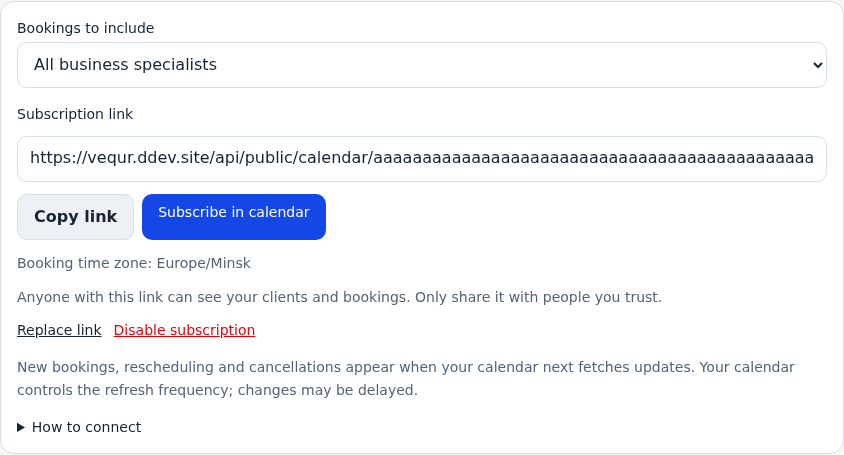
Select all specialists or one specialist. Different scopes have separate links, so check the choice before copying.
Create the secret link
Select Create secret link and wait for the address. Copy it in full. Do not post it in a public profile or client chat.
Connect Apple Calendar
Select Subscribe in calendar. Alternatively, on iPhone open Calendar → Calendars → Add Calendar → Add Subscription Calendar and paste the address. If Telegram does not hand off correctly, open the Vequr page in Safari.
Connect Google Calendar
In a computer browser, open Google Calendar. Next to Other calendars, select + → From URL, paste the address and add the calendar. Add the subscription on the computer, then check the same Google account on your phone.
Check dates and updates
Check the time zone and a familiar visit. After rescheduling in Vequr, wait for the external calendar to refresh; the calendar app controls its frequency. Importing a downloaded ICS file does not replace a subscription.
Replace or revoke access when needed
Replace link disables the old address, so reconnect the new URL in calendar apps. Revoke subscription stops access through the link. Already downloaded events may remain: remove the subscription in the calendar app too.
Check the result
The external calendar shows the correct business or specialist while appointments are managed in Vequr.
Questions and solutions
Why are updates delayed?
The calendar app controls refresh timing. Check the appointment in Vequr and allow the subscription to refresh.
Can I edit visits in Apple or Google?
Treat the subscription as a viewing calendar. Edit times, services and clients in Vequr.
There is no From URL on my phone
Add the subscription in Google Calendar on a computer browser, then check the same account and calendar visibility on your phone.
Updates stopped after replacing the link
Reconnect the new URL and remove the old subscription to avoid duplicates.
Someone else obtained the link
Replace or revoke it in Vequr. This stops future downloads through the old URL but does not remove previously saved copies.