
Before you begin
Open Contacts in the right business. Import needs a browser supporting contact selection, such as a supported Chrome on Android. Unsupported browsers do not display the button.
Import receives only the names and phones you select. Duplicate merging is a separate action across the owner’s contacts, not just visible search results or one selected business. Check matching identities before running it.
Step-by-step guide
Open From phone
Select From phone when available. If needed, move from Telegram to a supported external browser. System selection requires your direct tap.
Choose people
Select only the contacts you want to share. Avoid choosing your entire address book unnecessarily. The app accepts at most 200 selected contacts per attempt.
Review the preview
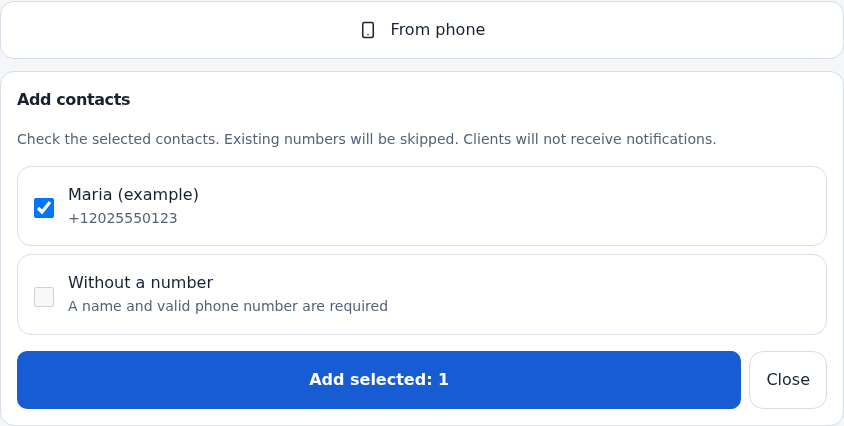
Check names and numbers. Existing numbers and invalid entries are marked and excluded from selection. Uncheck unwanted rows. Check business country and country codes for local numbers.
Save the selection
Save and wait for the result. This is separate from device selection. If saving fails, review saved rows and retry only remaining ones; processing stops at the first error.
Check Contacts
Find the added people and review details. Import does not verify their phone or send them notifications.
Merge duplicates when appropriate
Review phones and Telegram identities in similar cards before selecting Merge duplicates. A matching name alone does not prove identity. The operation covers matching contacts owned by your account.
Check the merge result
Wait for refresh and review remaining cards, numbers and linked visits. Do not assume an automatic undo action; preserve important original details using an available method before merging.
Check the result
Selected contacts were added, excluded rows skipped and the merge outcome reviewed.
Questions and solutions
There is no import button on iPhone
The button depends on browser capabilities. This is unrelated to phone verification. Use a supported import browser or add contacts manually.
A number is invalid
Check country code and full number. A row needs a name and usable phone. Correct it before retrying.
The number already exists
It is excluded from duplicate addition. Open and review the existing contact.
Some saved before an error
Review saved and failed rows. Retry the remaining entries after fixing the error rather than restarting blindly.
Does merging apply only to search results?
No. Search and business selection do not define its scope. It processes the owner’s contacts, so review identities first.